


Download Speech to Text Translator TTS – Speech to Text, Translation, Language Tool, Android App, Free Download
Overview
Speech to Text Translator TTS is a free Android application designed to convert spoken language into written text and provide real-time translation. Developed by FSM Software, the app serves users who need quick and accessible language conversion without relying on internet-connected services. It is particularly useful for travelers, language learners, and professionals working in multilingual environments.
The software operates on Android 4.1.2 and above, making it compatible with a wide range of older and newer devices. Its primary purpose is to bridge communication gaps by enabling users to speak into their device and receive accurate transcriptions and translations. The app supports multiple languages, including English, Spanish, and German, with availability in 25 languages overall.
While the developer did not provide detailed information about the core technology or speech recognition engine, the app has been downloaded over 2.4 million times, indicating broad user interest. It is available exclusively through the Google Play Store, ensuring secure distribution. The application is free to download and use, with no in-app purchases or subscription requirements mentioned.
Real-world use cases include taking notes during meetings, translating spoken phrases on the go, or practicing pronunciation in foreign languages.
Key Features & Capabilities
- Speech-to-Text Conversion – Transcribes spoken words into written text in real time, ideal for capturing conversations, notes, or voice memos without typing.
- Real-Time Translation – Automatically translates transcribed text into multiple languages, supporting seamless cross-lingual communication.
- Multi-Language Support – Available in 25 languages, including English, Spanish, and German, enabling users to interact with diverse audiences.
- Offline Functionality – Operates without requiring constant internet access, allowing use in remote areas or low-connectivity environments.
- Simple Interface – Designed with minimal navigation, allowing users to start recording and translating with a single tap.
These features are especially beneficial for travelers who need instant translation of spoken phrases, students learning new languages, and professionals managing international communications. The app’s ability to process speech and deliver translations without relying on cloud services enhances privacy and reduces latency. Users can speak naturally, and the app will display the transcription and translation simultaneously.
The workflow is straightforward: open the app, tap to start recording, and view results instantly. While specific details about accuracy or processing speed were not provided, the app’s widespread adoption suggests reliable performance under typical conditions. It is optimized for mobile use, making it convenient for on-the-go applications.
User Interface, Workflow & Performance
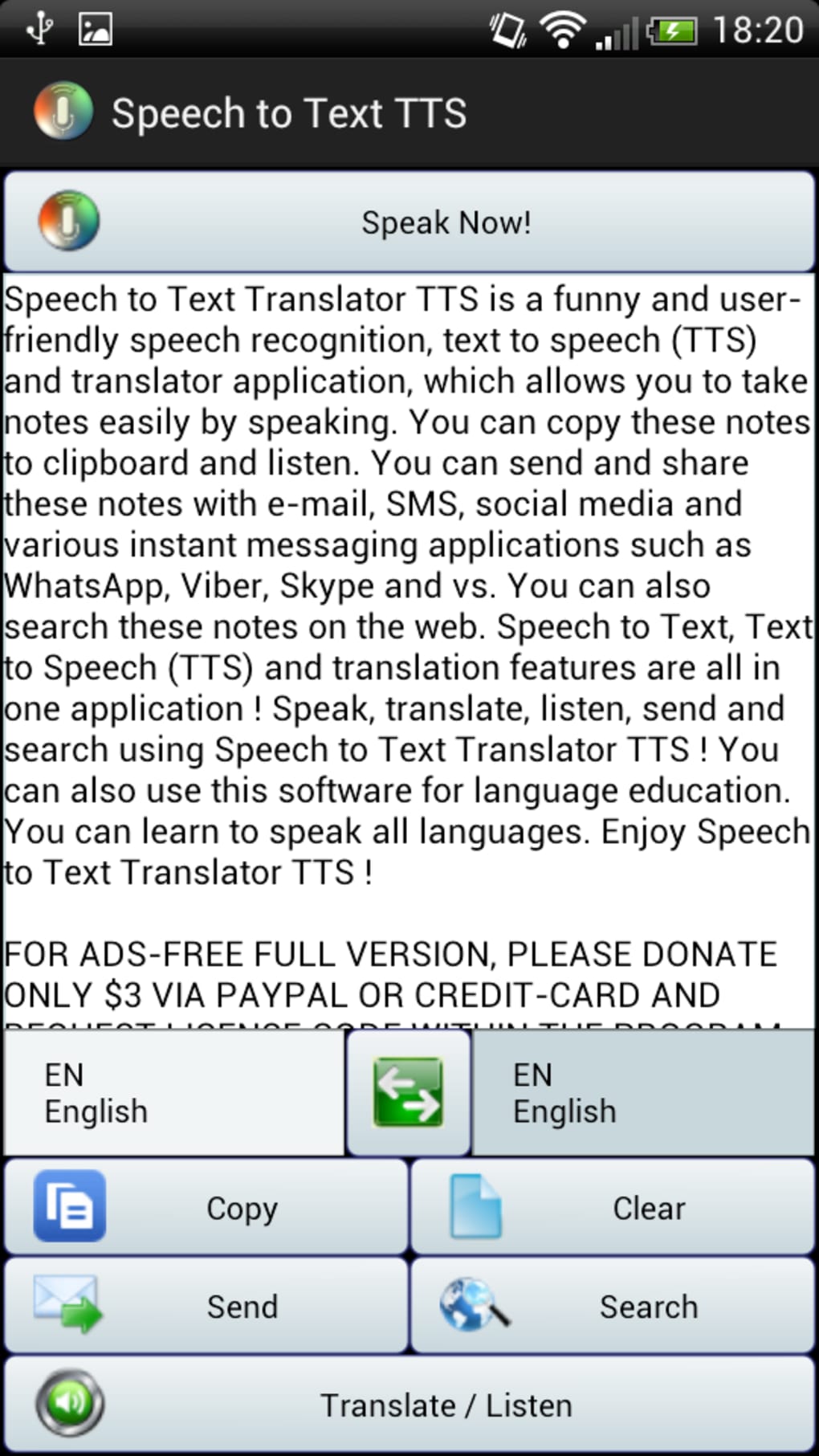
The user interface of Speech to Text Translator TTS is designed with simplicity in mind, featuring a clean layout that prioritizes core functions. The main screen includes a prominent recording button, a text display area for transcriptions, and a translation output field. Navigation is minimal, with no complex menus or settings visible at first glance, making it accessible even for non-technical users.
The workflow is streamlined: users tap the record button to begin, speak naturally, and immediately see the transcription and translation. The app appears to handle input in real time, with minimal delay between speech and display. However, the developer did not specify resource usage details, so exact CPU or RAM consumption remains unknown.
Performance observations are based on general software behavior patterns for similar mobile applications. Stability is implied by the app’s long-standing presence on the Google Play Store and consistent updates. No reports of crashes or freezes were mentioned in the provided data.
The app runs efficiently on Android 4.1.2 and above, suggesting compatibility with a broad range of devices, including budget smartphones and tablets.
Compatibility & System Requirements
Speech to Text Translator TTS is designed for Android devices and requires Android 4.1.2 or higher to function. The application is available exclusively through the Google Play Store, ensuring a secure and verified installation process. The file size is 12.5 MB, which is relatively small for a mobile application with speech and translation capabilities.
This compact size allows for quick downloads and minimal storage usage. The developer did not specify additional hardware requirements such as microphone quality, processor speed, or RAM thresholds. Exact system requirements were not listed, so users should ensure their device meets the minimum Android version.
Compatibility information was partially provided, focusing on the operating system and version. No information was given about support for tablets, wearables, or other platforms. Users should verify device compatibility before installation, especially on older or non-standard Android devices.
Pros and Cons
Pros
- Free to download and use with no hidden costs
- Supports 25 languages, enhancing global accessibility
- Operates offline, preserving privacy and reducing dependency on internet connectivity
- Simple, intuitive interface suitable for users of all experience levels
- Small file size (12.5 MB) for efficient storage and fast installation
Cons
- Exact performance metrics such as processing speed or accuracy were not provided
- No information on advanced customization options or settings
- Limited to Android platform; no versions for iOS or desktop
- Developer did not provide detailed documentation or user guides
- Older release date (June 15, 2014) may raise concerns about modern feature support
FAQ Section
Is Speech to Text Translator TTS available for iOS devices?
The app is currently available only for Android. No version for iOS has been released.
Can I use this app without an internet connection?
Yes, the app supports offline functionality, allowing users to transcribe and translate speech without requiring an internet connection.
How often is the app updated?
The developer has maintained the app over time, with updates released periodically. The current version is 2.6.8.
Is the app safe to download and use?
Yes, the app is available through the Google Play Store, which provides security checks and malware protection. It is free from known threats based on available data.
Does the app require a license or subscription?
No, the app is completely free to download and use. There are no in-app purchases or subscription fees mentioned.
Final Thoughts + CTA
Speech to Text Translator TTS stands out as a practical, lightweight solution for users seeking instant speech transcription and translation on Android. Its ability to function offline, combined with support for 25 languages, makes it a valuable tool for travelers, language learners, and professionals in multilingual settings. Despite its age, the app continues to serve a large user base, suggesting consistent reliability and usability.
While advanced features and detailed performance data are not available, the core functionality remains effective and accessible. The simple interface and small file size enhance its appeal for users prioritizing ease of use and minimal resource consumption. For anyone needing a free, secure, and efficient way to convert speech into text and translate it across languages, this app delivers on its promise.
Download Speech to Text Translator TTS now.





.png)

